01DIN-rail automation controller · V1-EX2
Wired like a standard relay.
Programmed in plain English.
JasperMate is a DIN-rail automation controller with a built-in AI assistant. Describe the logic. Check the flow it builds. Accept it before anything goes live. No ladder logic, no proprietary software, no licence fees.
Got one already? Here’s the quick start guide — from box to first output.
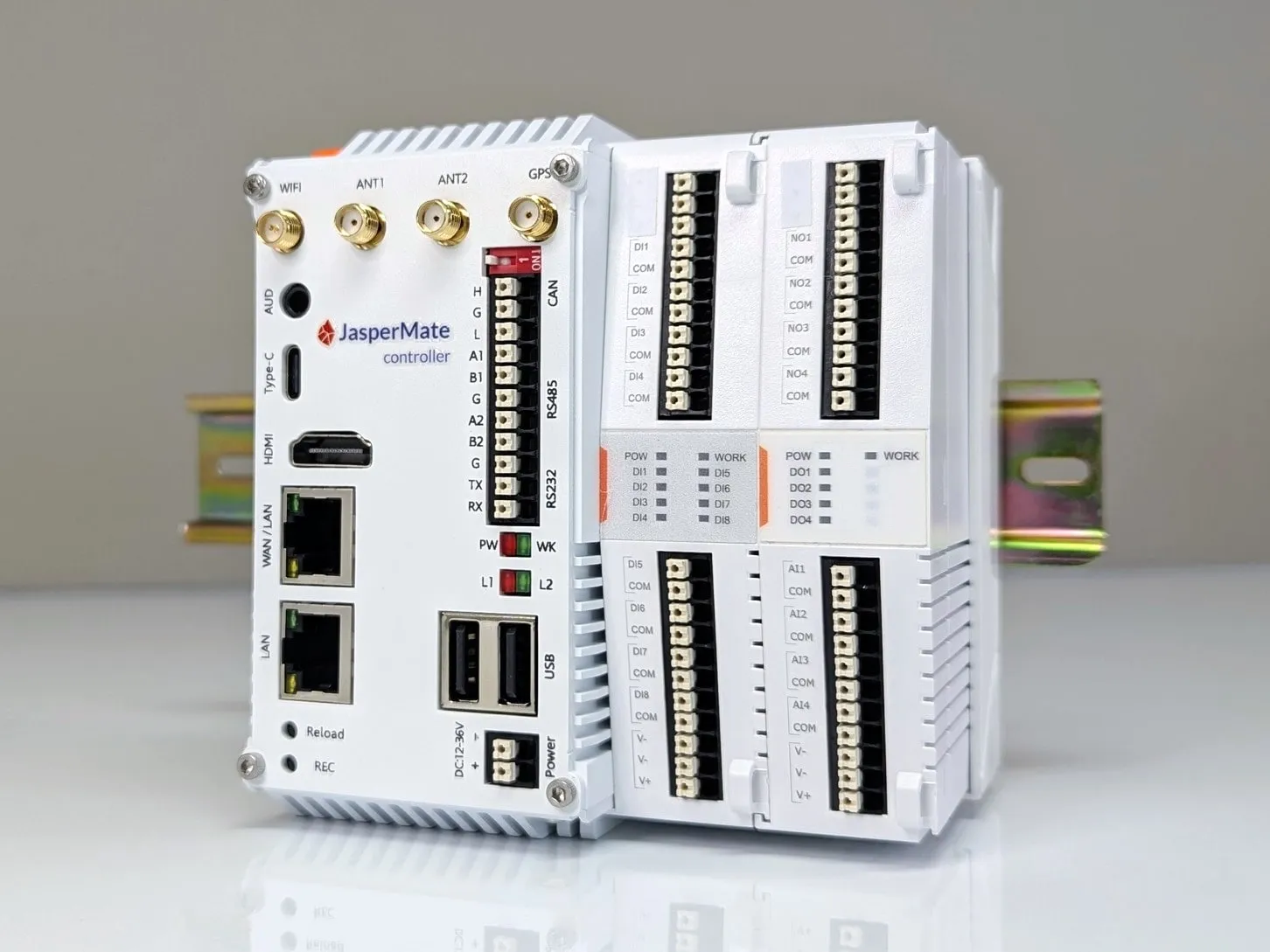
V1-EX2Base unit with onboard I/O
35mm DIN
02Who it's for
Built for the people who keep getting asked to automate things
You're an electrician or a small integrator. You can wire anything. The job stalls when it needs a PLC program: the software licence costs more than the controller, the programming cable only fits one brand, and the nearest PLC programmer is booked out six weeks. So the job gets subbed out, quoted high, or turned down.
JasperMate removes that step. If you can describe the sequence, you can program it. The controller wires in like the relay gear you already install, and the programming happens in a browser, in plain English, with the logic drawn out for you to check before it runs.
03How it works
From the box to running logic in three steps
STEP 1
Wire it in.
12-36V DC supply, WAN port to the router. Standard spring-loaded push-in terminals, 1.5mm² with bootlace ferrules. No wired network on site? 4G is on board.
STEP 2
Open your unit's jaspermate.link address.
Each controller has its own jaspermate.link address. Open it and you are connected. No IP hunting, no drivers, no software install. Any browser, including the one on your phone.
STEP 3
Describe the logic.
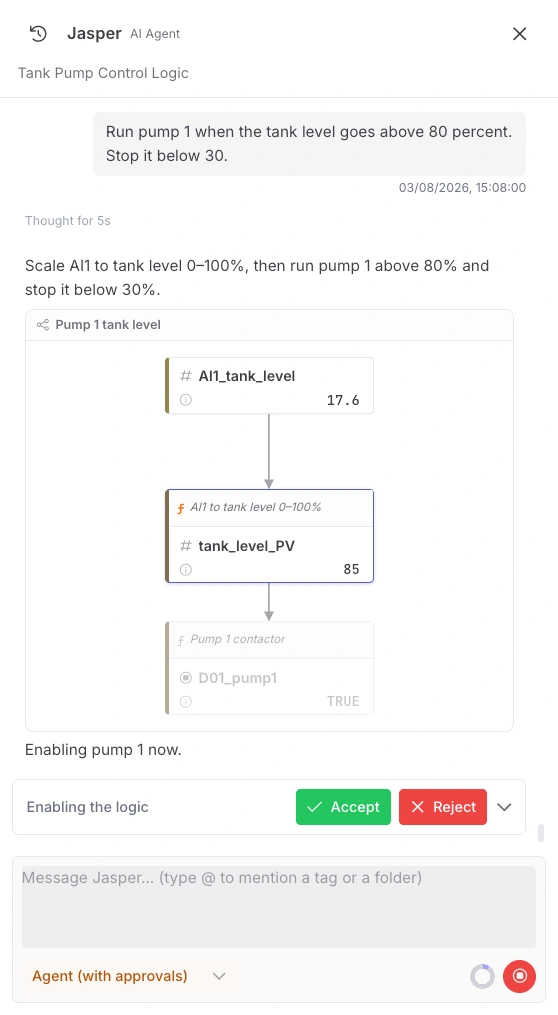
"Run pump 1 when the tank level goes above 80 percent. Stop at 30." The AI builds the tags and the logic, shows you the flow with live values, and waits. Nothing goes live until you accept it.
What programming it looks like
Screenshots from the JasperMate web app
Pick an example
You type
Run pump 1 when the tank level goes above 80 percent. Stop it below 30.
Jasper replies: Scale AI1 to tank level 0-100%, then run pump 1 above 80% and stop it below 30%.
- 01
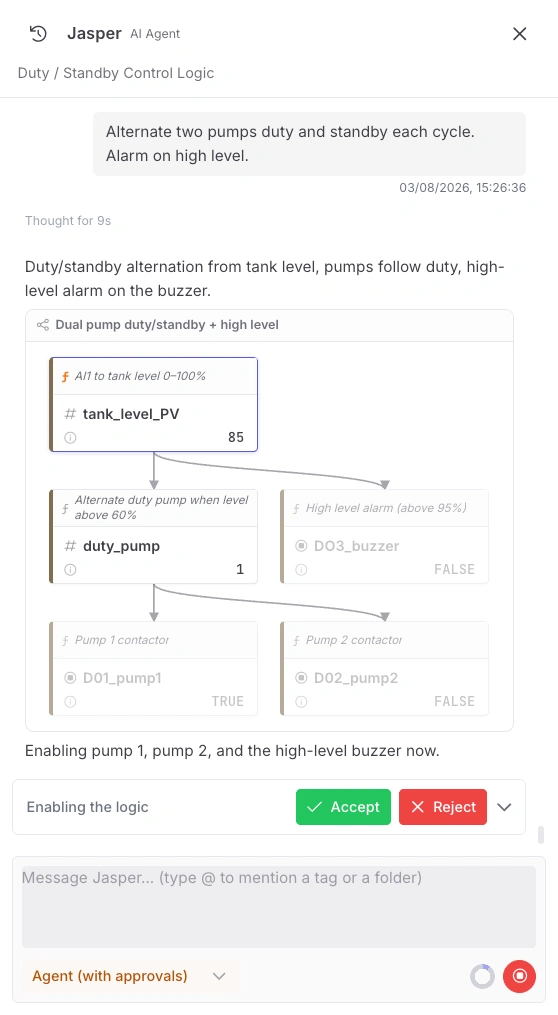
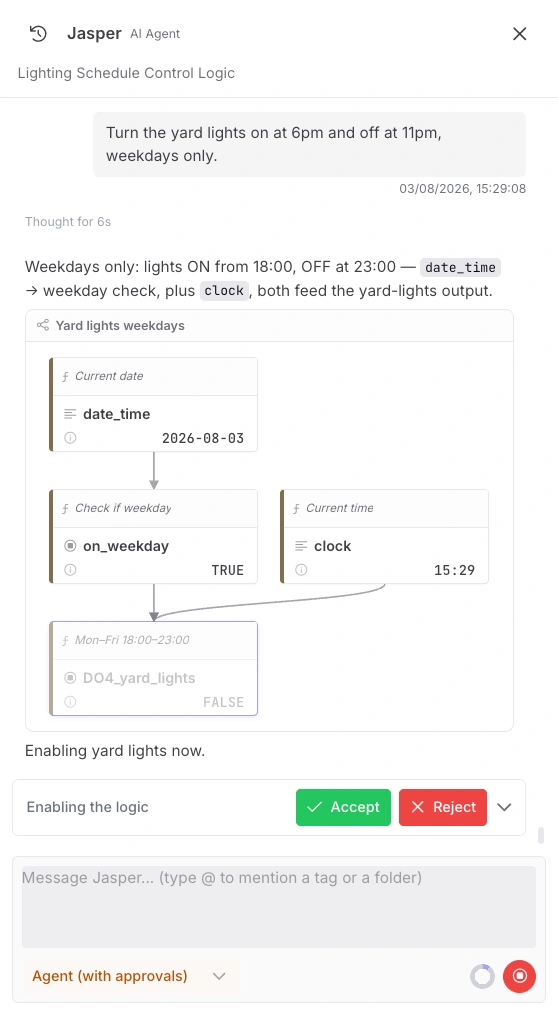
You type a sentence.
Plain English, in a browser. No mnemonics, no function blocks, no vendor software.
- 02
It builds the tags and the logic.
Real tag names, real scaling, live values off the controller. Every block carries the comment explaining it.
- 03
Nothing goes live until you accept.
The new outputs sit greyed out until you press Accept. Reject throws the lot away.
60-second setup video · coming soon
The full setup, wiring to running logic, in one minute. Until it lands, the datasheet and the wiring diagrams below tell you what the video would.
04Features
What you get, in the order you'll care about it
F01
No ladder logic required.
Describe what you want in plain English. The AI turns it into control logic and draws it as a flow diagram with comments, in language an electrician reads, not vendor mnemonics.
F02
You approve everything.
The AI proposes. You dispose. Every piece of logic is shown to you before it deploys, and the AI never touches a running machine without your approval. Your name is on the job; the control stays with you.
F03
No proprietary anything.
No programming cable. No dongle. No $2,000 software licence. No annual maintenance agreement. The development environment is a web browser, and it ships with the controller.
F04
Wires like the gear you already install.
35mm DIN rail. 12-36V DC supply. Push-in terminals. 4-20mA analog inputs, 12-24V digital inputs, 3A dry-contact relays for contactor coils and pilot lights. Nothing on the terminal strip will surprise you.
F05
Remote access built in.
4G and dual-band WiFi on board, with two nano-SIM slots — any SIM with a data plan works in either. First-time Wi-Fi setup happens from a phone: the unit opens its own setup network and the setup page appears by itself, no app, no laptop. The controller only ever makes outbound connections, so there's no port forwarding, no static IP, and no VPN router to buy and configure. Check the site from the ute or the office.
F06
The logic runs on the unit.
Your control logic executes locally on the controller, and if it ever loses contact with the I/O, outputs drive to their configured safe states. If the internet drops, the pumps keep pumping. The connection is only needed for the AI assistant and remote access.
05Applications
The utility and auxiliary jobs that keep a site running
Pumps and fluid control
Tank level management, duty/standby pump sets, valve sequencing, lift stations.
Duty/standby pump set: 2 level sensors on analog inputs, 2 relay outputs to contactor coils, alternation and high-level alarm. One JasperMate, no expansion cards.
Building services
HVAC interlocks and staging, lighting schedules, access control logic.
Lighting and exhaust interlock: 4 digital inputs from switches and run signals, 3 relay outputs, weekday schedule on the onboard clock.
Process loops
Heating and cooling with hysteresis, simple mixing, dosing sequences.
Tank heating: 1x 4-20mA temperature transmitter, 1 relay to the heater contactor, setpoint with hysteresis and over-temperature lockout.
Auxiliary equipment
Conveyors, assembly stations, and retrofits where a rats-nest relay panel is due for retirement.
Conveyor interlock: run permissives on digital inputs, staged start across 3 relays, fault annunciation on the fourth.
06Straight answers
The questions you're already asking
What happens when the internet drops out?
The logic keeps running. It executes on the controller, not in the cloud. You lose the AI assistant and remote access until the connection returns; the machine doesn't notice.
Can the AI change my logic on its own?
No. The AI generates and explains logic. It cannot deploy anything. Deployment is a human action, every time.
What if I don't want to use the cloud at all?
Then run it without one. The controller executes your deployed logic on the unit, and the local web interface keeps working with no connection at all. What you give up is the AI assistant, remote access and cloud backups, not the machine. Plenty of sites run air-gapped by policy, and JasperMate is built to be one of them.
Is it a safety controller?
No. JasperMate is for control, monitoring and interlocking of standard duty. Emergency stops, guarding and other safety functions need dedicated safety-rated devices, same as with any standard PLC or smart relay.
Do I need to know how to code?
No. Plain English and the flow diagram cover the intended use. If you do write code, the whole thing is programmable in JavaScript, and you can read and edit everything the AI produces.
07Specifications
The numbers, set out like a datasheet
| Supply | 12-36V DC, 12 W |
| Digital inputs | 8x, 12-24V DC |
| Relay outputs | 4x dry contact, 3 A |
| Analog inputs | 4x 4-20mA, isolated |
| Expansion | Up to 10 I/O cards via side-bus |
| Ethernet | 2x RJ45, independent MACs. WAN 10/100/1000, LAN 10/100 |
| WiFi | Dual-band 802.11 b/g/n/ac/ax |
| Cellular | LTE Cat 4, 2x nano-SIM. Any SIM with a data plan, in either slot |
| Uplink order | Ethernet (WAN), then WiFi, then SIM 1, then SIM 2 |
| Serial | 2x RS485, 1x RS232, 1x CAN |
| Protocols | EtherCAT, Modbus TCP and RTU, serial, MQTT. InfluxDB datalogging. Built-in web HMI |
| GPS | Onboard receiver with position reporting |
| Primary method | AI assistant via chat, with visual logic review |
| Alternative | JavaScript |
| Interface | Web browser, no install |
| Compute | Quad-core ARM Cortex-A55, 4 GB DDR4, 32 GB eMMC |
| Mounting | 35mm DIN rail |
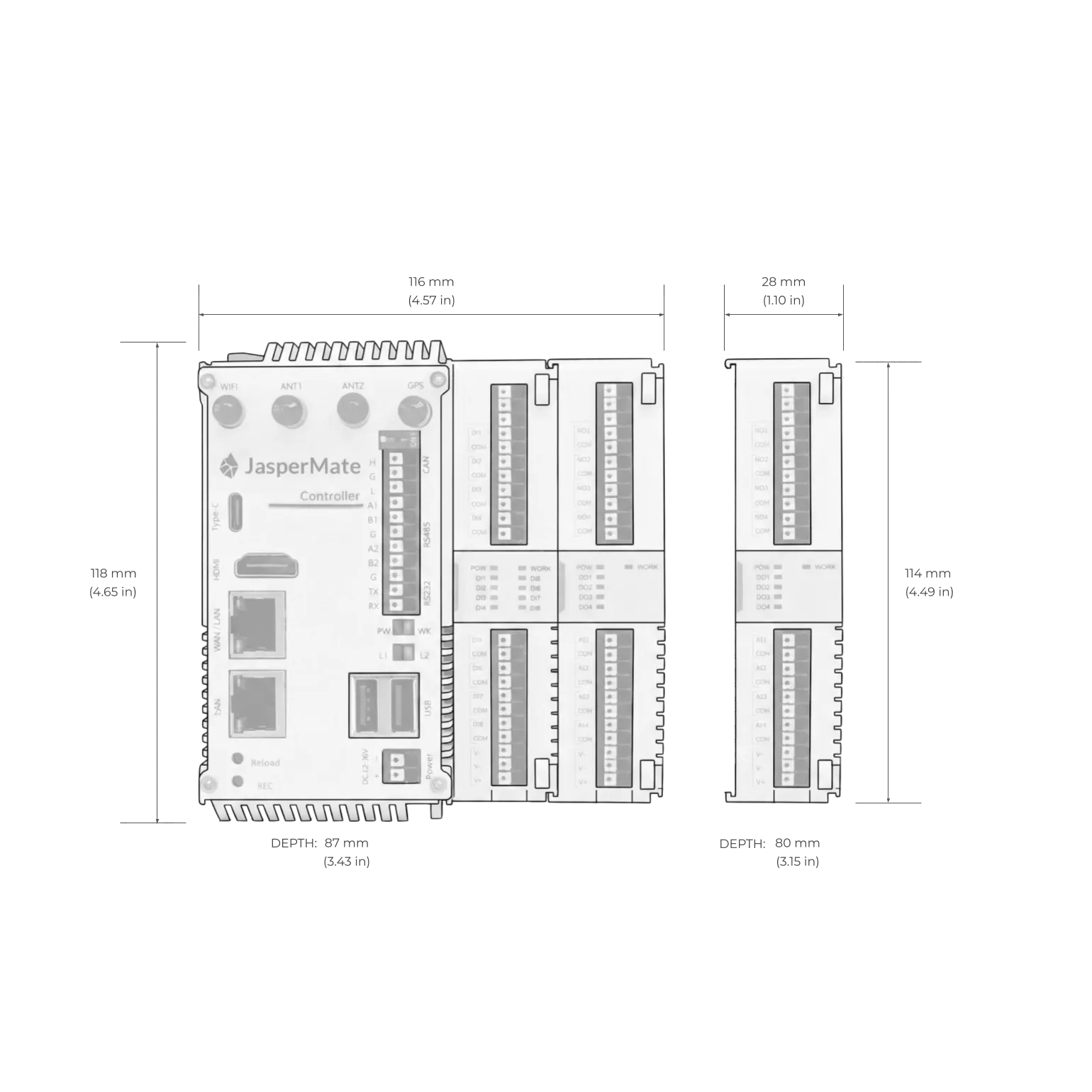
| Dimensions (base unit) | 118H x 116W x 87D mm |
| Expansion card | 114H x 28W x 80D mm |
| Weight | 500 g |
| Enclosure | Flame-retardant ABS/PC, IP20 (cabinet installation required) |
| Operating temperature | -20°C to +70°C |
| Humidity | 5% to 95% non-condensing |
Full datasheet:download the PDF. No login, no form.
08Wiring
The wiring section, on the page, before you buy
No login, no "contact sales for documentation". Terminals are spring-loaded push-in. Recommended wire 1.5mm² with bootlace ferrules, maximum 2.5mm². Digital inputs take standard switching sensors, switches and buttons at 12-24V DC. Relay outputs are 3A dry contacts for contactor coils, pilot lights and signals to other systems. Analog inputs are standard 4-20mA in 2-wire or 4-wire configurations.
Diagrams are indicative. Verify terminal designations against the datasheet before wiring.
09Expansion and box contents
Start with the base unit, grow sideways
The base unit carries 8 digital inputs, 4 relay outputs and 4 isolated 4-20mA analog inputs. When a job outgrows that, expansion cards clip onto the side-bus, up to 10 per controller, adding digital and analog I/O including 4-20mA and 0-10V outputs. Each card is 28mm wide, so a full stack still fits a standard cabinet.
No re-wiring of the base unit, no new software. Added I/O shows up in the same browser interface, ready to use in the next piece of logic you describe.
Beyond the side-bus, JasperMate talks to gear you already have. Remote I/O, drives, meters and other controllers connect over the protocols below, and the same interface doubles as a web HMI, so operators get a screen without a separate panel PC.
- EtherCAT
- Modbus TCP
- Modbus RTU
- Serial
- MQTT
- InfluxDB datalogging
- Web HMI
In the box
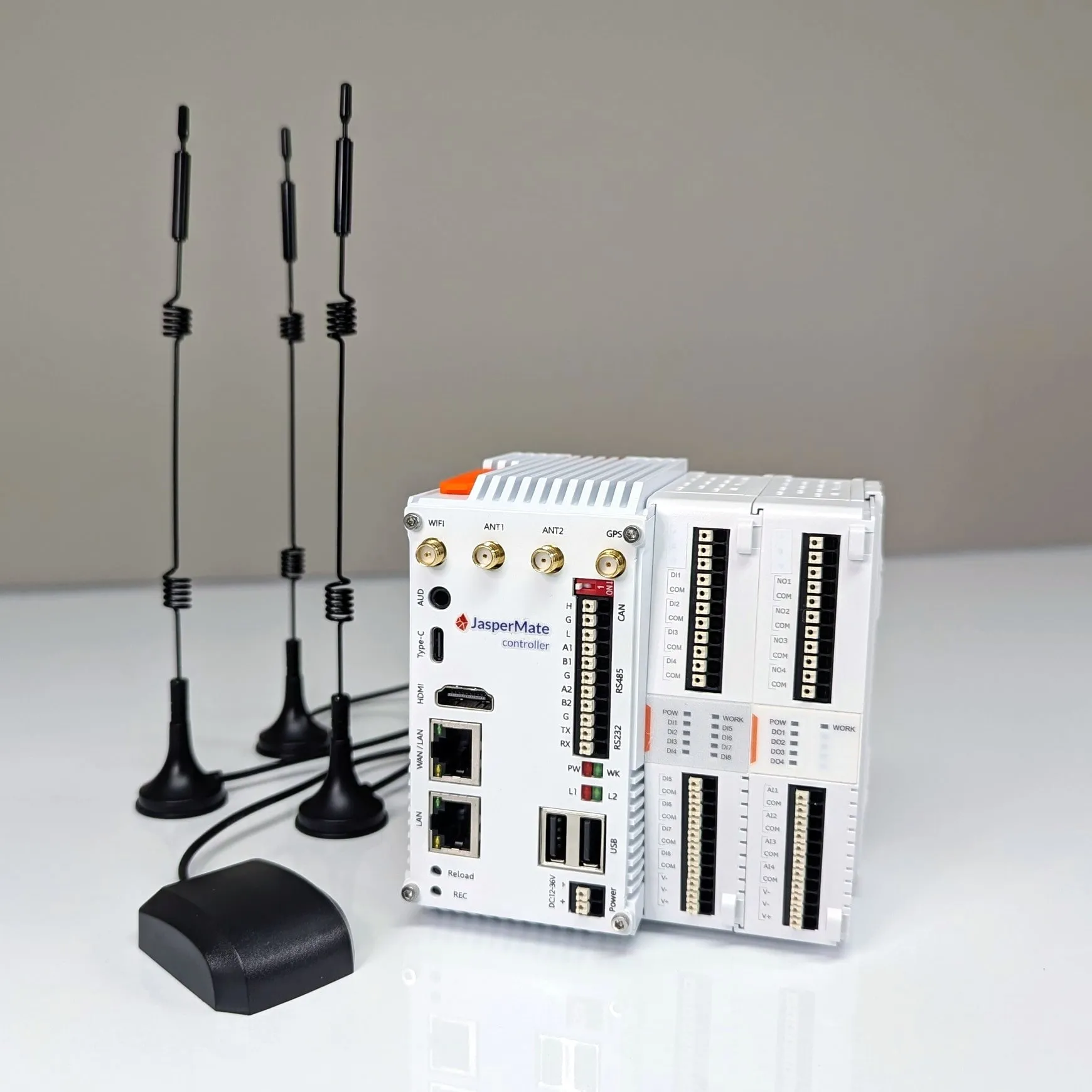
- 01JasperMate controller, base unit with onboard I/O
- 02WiFi antenna
- 032x 4G antennas
- 04GPS antenna
- 051m Ethernet cable
- 06Quick start guide
10What JasperMate is not
Read this before you buy
Every controller has limits. Here are ours, upfront, so you don't find them on site.
Limit
Not for high-speed I/O.
The digital inputs are not high-speed counters. Encoder feedback, fast pulse counting and motion control are the wrong fit.
Limit
Not a safety device.
Use safety-rated relays or controllers for e-stops and guarding, as you would with any standard controller.
Limit
Cabinet mount only.
IP20 enclosure. It needs to live in a panel, not on a wall in the weather.
Limit
AI features need internet and a JasperX account.
The controller and your deployed logic run without either. The AI assistant doesn't. How the AI is paid for is in the pricing section below, not hidden in a FAQ.
Not sure if a job fits? Email the spec to[email protected]and we'll tell you straight, including when it isn't the right controller.
11In the field
Running in production, not in a lab
Water and wastewater
- Pump station control
- Automated pond level control
Manufacturing SME
- Supervisory control of set of furnaces
- Pump monitoring and controls
General industrial
- Control of MeBr fumigation system
- Vessel HVAC controls
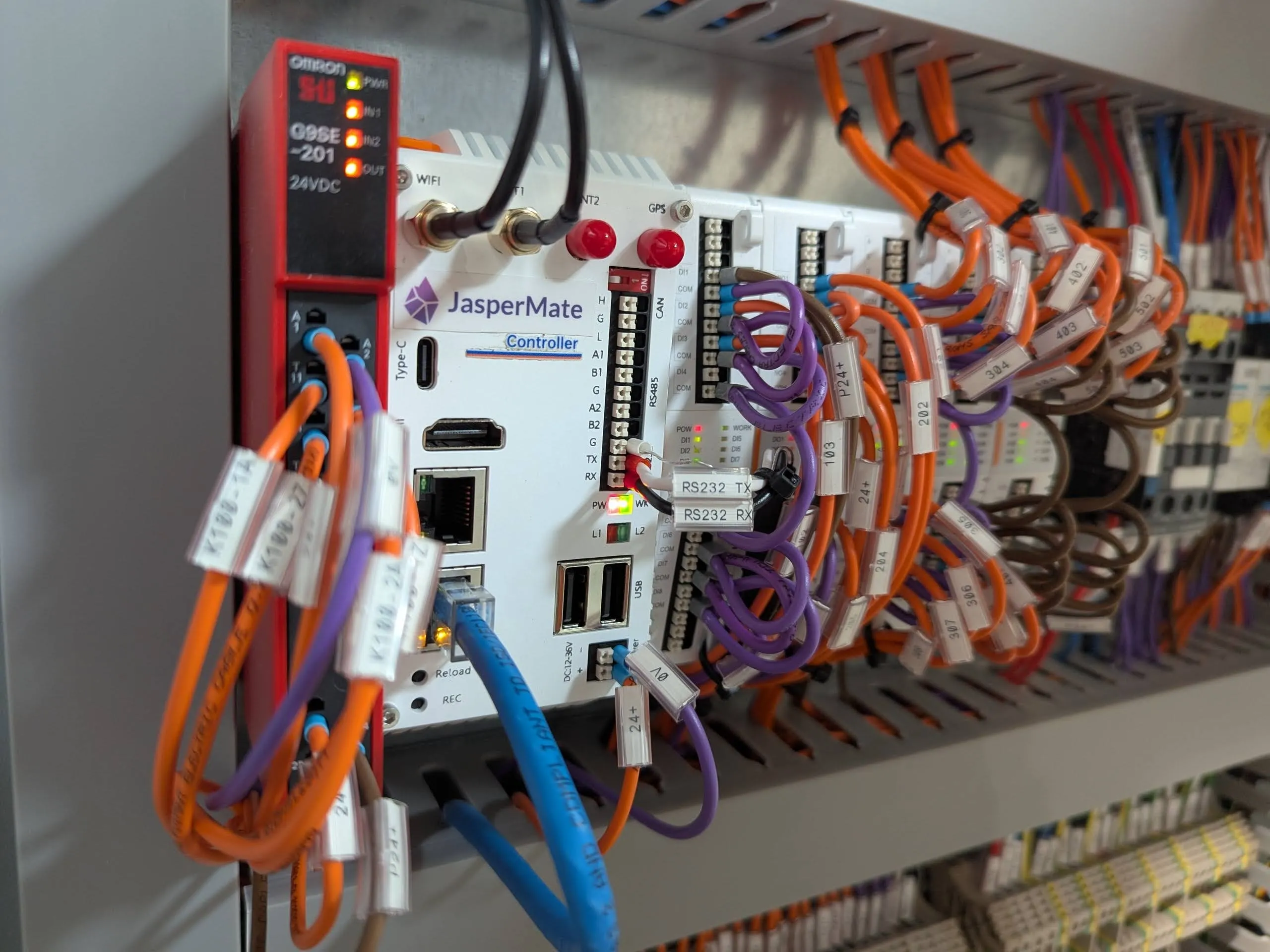
Used on industrial and commercial sites around Australia, including a port authority and a local government.
12Pricing and ordering
One price. On the screen.
Hardware
A$880inc GST
That includes the controller, the runtime, the web-based development environment, and remote access. No software licence to program it. No annual fee to keep your logic running. No "call for pricing".
Includes a Jasper, the AI agent seat assigned to your JasperMate's program.
Buying for a client job or need multiple units? Email a quote request to[email protected]and we'll turn it around within one business day.
The AI side, in the open
A Jasper builds your program
Your JasperMate comes with a Jasper, the AI agent seat assigned to its program. That's the AI that writes, explains and reworks your logic.
Asking is always included
Ask-mode AI answers questions and helps diagnose faults on every JasperX account, no seat required.
Heavy use draws on your plan
AI usage has plan limits, and credit packages top them up when a big job needs more. No surprise invoices.
Deployed logic is free to run
Once approved and deployed, your logic runs on the controller. No cloud, no credits, no subscription needed to keep a pump pumping.
13FAQ
The details, without the run-around
Who should install it?
A licensed electrician, in a cabinet, like any other DIN-rail control gear. Supply is 12-36V DC and the relay outputs are 3A dry contacts intended for coils and signals, not direct loads.
What sensors and devices does it work with?
Standard industrial gear: 12-24V DC switching sensors and inputs, 4-20mA transmitters (2-wire or 4-wire), and anything you can drive from a 3A dry contact. Expansion cards add more I/O, including analog outputs.
How is the AI paid for?
Your JasperMate comes with a Jasper, the AI agent seat assigned to its program, so the AI that builds your logic is included with the hardware. Asking questions and diagnosing faults is included with every JasperX account. Heavier AI use draws on your plan's AI limit, and credit packages top it up when a big job needs more. Deployed logic costs nothing to run.
Does it do Modbus or talk to other PLCs?
Yes. Modbus TCP and RTU, EtherCAT, plain serial and MQTT are all supported, over the onboard ports (2x RS485, 1x RS232) or Ethernet, so remote I/O, drives, meters and other controllers connect directly. Values can be logged to InfluxDB, and the same interface doubles as a web HMI. If you have a specific protocol or device in mind, email [email protected] with the spec and we will confirm it against the current firmware before you buy.
How does first-time Wi-Fi setup work?
From a phone, no app, no laptop. A unit that has not been set up yet opens its own temporary Wi-Fi network, and joining it brings up the setup page by itself: pick your Wi-Fi, type the password, done. The password is encrypted in your browser before it leaves the phone, and while the setup network is open the unit exposes only that setup page — the rest of the device, and your own network behind it, stay unreachable. Miss the window and holding Reload for 3 seconds opens a new one.
Can I update the software myself?
The on-device software updates over the air with signed, verified packages, no laptop or programming cable involved. Major operating system upgrades are handled with our support.
What's the warranty?
1-year warranty on the hardware. Australian Consumer Law guarantees apply regardless of anything written here: if the product has a major failure you are entitled to a replacement or refund. Email [email protected] and it reaches the people who built it.
Where is it made, and who's behind it?
JasperMate is developed by ControlX Engineering Pty Ltd, an Australian controls engineering company. Support is by email to [email protected], and it reaches the engineers who built the product, not a call centre.
14Final check
Judge it yourself
Sixty seconds of video shows the whole setup, the wiring diagrams are above, and the limits are listed in plain sight. If it looks like it fits your next job, order a unit. If you're not sure, email us the job spec and we'll tell you straight whether JasperMate is the right fit, including when it isn't.